

Are your Google Ads campaigns burning through your budget with little to show for it? For many realtors, small business owners, and local service providers, Google Ads can feel like a high-stakes gamble. You know the potential for high-quality leads is there, but lackluster results and rising costs often create a frustrating cycle of wasted ad spend. The problem isn't the platform; it's the approach.
Success on Google Ads isn't about luck; it's about a clear, results-oriented strategy. A well-intentioned campaign—like one a local realtor in Boca Raton might run for "luxury waterfront homes"—can easily fail due to poor keyword choices, generic ad copy, or a confusing landing page. This disconnect leads to missed opportunities while your competitors seem to capture all the traffic.
This guide moves beyond generic advice to deliver a consultative blueprint of the top 10 google ads best practices you must implement for measurable growth. We will deconstruct each practice into actionable steps, transforming your campaigns from a financial drain into a predictable lead-generation engine. From foundational keyword research to advanced conversion tracking, you will learn exactly how to refine your targeting, optimize your bidding, and improve your Quality Score to finally achieve the return on investment you've been seeking.
1. Master Keyword Research and Match Types
The absolute foundation of any successful campaign, and a critical component of Google Ads best practices, is meticulous keyword research and strategic match type implementation. This dual-pronged approach ensures your ads are displayed to users with high purchase intent, directly connecting your budget to relevant search queries. It’s the difference between casting a wide, expensive net and using a precision-guided lure to attract your most valuable customers.

Essentially, you are telling Google exactly who to show your ads to. By selecting the right keywords, you align your ads with user intent. By applying the correct match types, you control how closely a user's search query must match your keyword to trigger an ad, optimizing both reach and cost-efficiency.
How to Implement Match Types Strategically
Start with a more controlled approach and expand as you gather data. This method protects your initial budget from being wasted on irrelevant clicks.
- Exact Match
[keyword]: Use for high-intent, bottom-of-the-funnel keywords. A small business selling specialized equipment might use[buy commercial espresso machine]to capture users ready to purchase. This offers the highest relevance but lowest reach. - Phrase Match
"keyword": Ideal for capturing a variety of relevant searches while maintaining control. A local realtor could use"homes for sale in Boca Raton"to appear for searches like "new homes for sale in Boca Raton" or "3 bedroom homes for sale in Boca Raton." - Broad Match
keyword: Use this match type cautiously, ideally with Smart Bidding strategies. It provides the widest reach but can trigger ads for irrelevant searches if not managed with a strong negative keyword list. It’s best used after a campaign has matured.
Actionable Tips for Optimization
Pro Tip: Your Search Terms report is your most valuable research tool. Regularly review it to discover new high-performing keywords to add to your campaigns and irrelevant queries to add as negative keywords. This continuous refinement is a cornerstone of effective account management.
Implement these practices from day one:
- Build a Strong Negative Keyword List: Before launching, create a list of terms you don't want to rank for (e.g., "free," "jobs," "DIY," "training").
- Use Keyword Research Tools: Leverage Google Keyword Planner or other professional tools to identify keywords with commercial intent and manageable competition.
- Segment Ad Groups: Create tightly themed ad groups where all keywords are closely related. This improves your Quality Score and ad relevance. For example, a realtor should separate ad groups for "homes for sale in Miami" and "condos for sale in Miami Beach."
For a deeper dive into keyword strategies, this video provides excellent insights:
2. Write Compelling Ad Copy and Use Extensions
While keywords get your ads in front of the right audience, your ad copy persuades them to click. Crafting compelling headlines and descriptions, paired with strategic ad extensions, is a fundamental Google Ads best practice that directly impacts click-through rates (CTR) and Quality Score. This is your first chance to communicate your value proposition and stand out from competitors on a crowded search results page.

Essentially, your ad is a direct conversation with a potential customer. Strong copy resonates with their needs, while extensions provide additional, trust-building information that simplifies their next step. This combination makes your ad more prominent and effective, maximizing the value of every impression.
How to Implement Ad Extensions Strategically
Start by adding the extensions most relevant to your business goals. Google's algorithm will automatically show the best-performing combinations, so providing more options increases your chances of success.
- Sitelink Extensions: Direct users to specific pages on your site. A real estate agent could use sitelinks for "View Miami Listings," "Seller's Guide," and "Contact Us," giving users tailored pathways.
- Callout Extensions: Highlight key business benefits. A local service provider might use callouts like "24/7 Emergency Service," "Licensed & Insured," and "Free Estimates."
- Structured Snippets: Showcase specific aspects of your products or services. A software company could use the "Features" header to list "CRM Integration," "Automated Reporting," and "Mobile Access."
- Promotion & Price Extensions: Ideal for businesses running special offers. Displaying a "20% Off First Service" or seasonal sale directly in the ad can significantly boost clicks.
Actionable Tips for Optimization
Pro Tip: Align your ad copy and extensions directly with the content of your landing page. If your ad promises a "Free Consultation," the landing page must prominently feature that offer and a simple way to claim it. This consistency is crucial for conversions and improves your Quality Score.
Implement these practices to enhance your ad performance:
- Include a Clear Call-to-Action (CTA): Tell users exactly what to do next. Use action-oriented language like "Book Your Tour," "Get a Free Quote," or "Shop Now."
- Test Responsive Search Ads (RSAs): Provide multiple headlines and descriptions and let Google’s machine learning identify the highest-performing combinations. This is a core component of modern ad creation.
- Incorporate Emotional Triggers: Address user pain points or aspirations. Use words like "trusted," "guaranteed," "effortless," or "exclusive" to connect on an emotional level and build confidence.
3. Optimize Your Landing Page for Relevance and Conversions
Your ad is only half the journey; the landing page is where conversions happen. A crucial element of Google Ads best practices is ensuring a seamless and relevant transition from ad click to landing page. This alignment directly impacts your Quality Score, ad costs, and, most importantly, your conversion rate. A disconnected experience leads to high bounce rates and wasted ad spend, while a congruent one builds trust and guides users toward your desired action.

Essentially, your landing page must fulfill the promise made in your ad. If a user clicks an ad for "emergency plumbing services," they expect to land on a page that immediately addresses that urgent need, not a generic homepage. This relevance signals to both Google and the user that your page is a high-quality result, enhancing performance and user satisfaction.
How to Implement a Relevant Landing Page Strategy
The core principle is specificity. Create dedicated landing pages that mirror the intent of your ad groups and keywords. This focused approach removes distractions and streamlines the path to conversion.
- Service-Specific Pages: A local law firm advertising "family law services" should direct clicks to a page detailing only their family law practice, not their general services page.
- Single-Goal Lead Gen Pages: A financial advisor running a campaign for a "retirement planning guide" should use a landing page with a single call-to-action: download the guide. Removing site navigation keeps the user focused on the conversion goal.
- Location-Specific Pages: A realtor targeting "homes for sale in Miami" should have a dedicated landing page with testimonials, listings, and contact information specific to the Miami area. This builds local credibility.
Actionable Tips for Optimization
Pro Tip: Your landing page headline is the first thing users see. Ensure it matches or closely mirrors the headline of the ad they just clicked. This "message match" immediately reassures users they are in the right place, drastically reducing bounce rates.
Implement these practices for a high-performing landing page:
- Prioritize Mobile-First Design: The majority of Google searches happen on mobile devices. Your landing page must load quickly and be easy to navigate on a small screen.
- Ensure a Clear Call-to-Action (CTA): Your CTA button should be prominent, use action-oriented language (e.g., "Get Your Free Quote," "Book an Appointment Now"), and be placed above the fold.
- A/B Test Everything: Continuously test different headlines, images, CTA button colors, and form lengths to identify what resonates best with your audience and improves conversion rates.
4. Leverage Smart Bidding and Automated Strategies
Leveraging Google's sophisticated machine learning is a cornerstone of modern google ads best practices. Smart Bidding automates bid adjustments in real time for every single auction, a task impossible to perform manually. This allows you to optimize for specific conversion actions, aligning your ad spend directly with tangible business outcomes like leads or sales. It moves beyond simple click optimization to focus on what truly drives your business forward.
Essentially, you are handing the complex task of bid-setting over to Google's AI, which analyzes thousands of signals to predict conversion likelihood. By choosing the right automated strategy, you instruct Google on your primary business goal, whether that's maximizing leads or achieving a specific return on investment.
How to Implement Smart Bidding Strategically
The key to success with automated bidding is providing the algorithm with accurate data and clear objectives. Your strategy choice depends entirely on your business model and campaign goals.
- Target CPA (Cost Per Acquisition): Ideal for lead generation. A marketing manager for a B2B service could set a Target CPA of $75 to ensure they acquire new client leads at a profitable rate.
- Target ROAS (Return On Ad Spend): The go-to for e-commerce. A small business selling online aiming for a 4x return would set a Target ROAS of 400%, telling Google to prioritize auctions likely to result in high-value sales.
- Maximize Conversions: Use this when your main goal is to generate the highest number of conversions possible within your daily budget. It’s a great starting point for new campaigns once conversion tracking is established, as it helps the system learn quickly.
Actionable Tips for Optimization
Pro Tip: Do not make drastic changes during the initial "learning period," which typically lasts about 5-7 days after implementing a new bid strategy. The algorithm needs stable, consistent data to learn effectively. Monitor performance closely, but allow the system time to calibrate before judging its effectiveness.
Implement these practices for a smooth transition to automation:
- Ensure Robust Conversion Tracking: Smart Bidding is only as smart as the data you feed it. Before switching, verify that your conversion tracking for form fills, calls, or purchases is 100% accurate.
- Gather Enough Data: It is recommended to have at least 15-30 conversions over a 30-day period before switching to a Target CPA or Target ROAS strategy to give the algorithm a reliable performance baseline.
- Set Realistic Targets: When setting a Target CPA or Target ROAS, base it on your campaign's historical performance. Setting an overly aggressive target from the start can stifle performance.
5. Refine Audience Targeting and Segmentation
Moving beyond keywords, one of the most powerful Google Ads best practices is sophisticated audience targeting. While keywords capture user intent, audience layers add a crucial dimension of user identity. This strategy allows you to show your ads not just to people searching for specific terms, but to specific types of people, ensuring your message resonates on a deeper, more personal level.
Essentially, you are adding demographic, interest, and behavioral data to your targeting mix. This refines your ad delivery to users who are most likely to convert, whether they are actively searching or simply fit the profile of your ideal customer. It’s about creating personalized ad experiences that drive higher engagement and a stronger return on investment.
How to Implement Audience Targeting Strategically
Start by identifying your core customer personas and then find the corresponding audiences within Google Ads. It is wise to test audiences using the "Observation" setting before committing budget with the "Targeting" setting.
- In-Market Audiences: Target users who Google’s data indicates are actively researching and are close to buying a product or service like yours. A local car dealership would target users in the "Autos & Vehicles/Cars (New)" in-market segment.
- Affinity & Custom Audiences: Reach users based on their long-term interests. A marketing manager for a B2B SaaS company could create a custom audience of people who browse specific competitor websites or use certain business apps.
- Remarketing & Customer Match: This is your lowest-hanging fruit. Target users who have already visited your website or are on your customer email list. A realtor can remarket to users who viewed a specific property listing but did not fill out a contact form.
Actionable Tips for Optimization
Pro Tip: Combine audience layers for hyper-targeted campaigns. A realtor in Miami could layer an in-market audience for "Real Estate/Residential Properties (For Sale)" with a demographic filter for a specific income bracket to reach highly qualified potential buyers.
Implement these practices to enhance your targeting:
- Use Observation Mode First: Apply audiences in "Observation" mode to your Search campaigns. This collects performance data without limiting your reach, showing you which segments convert best before you narrow your focus.
- Build Exclusion Lists: Just as with negative keywords, create audience exclusion lists. For instance, exclude existing customers from a new lead generation campaign to focus your budget on acquiring new business.
- Leverage Customer Match: Upload your customer lists (with consent) to create high-value audiences for remarketing, upselling, or finding similar users with Similar Segments.
6. Implement Flawless Conversion Tracking and Attribution
Running Google Ads without precise conversion tracking is like driving with your eyes closed; you are spending money without knowing if you are reaching your destination. Implementing comprehensive conversion tracking and understanding attribution models are Google Ads best practices that transform your campaigns from a cost center into a measurable revenue driver. It's the only way to accurately quantify your return on investment and make data-driven decisions.
Essentially, conversion tracking tells Google what user actions are valuable to your business. By defining these actions, you can see which keywords, ads, and campaigns are generating results. Attribution models then help you understand the customer journey by assigning credit to the different touchpoints that led to that conversion.
How to Implement Conversion Tracking Effectively
Start by identifying your key business goals and setting up specific conversion actions for each. This ensures you're measuring what truly matters, whether it's a sale, a lead, or a sign-up.
- E-commerce Stores: Track purchases with dynamic revenue values. This allows you to directly measure your return on ad spend (ROAS) and optimize for high-value transactions.
- Service Businesses: Track form submissions for quote requests and phone calls from ads. A local plumbing company, for instance, must track both to understand the full impact of their campaigns.
- B2B/SaaS Companies: Track both demo requests (micro-conversions) and paid subscriptions (macro-conversions) to map the entire customer funnel.
Actionable Tips for Optimization
Pro Tip: Use Google Tag Manager (GTM) to deploy and manage your tracking codes. GTM simplifies the process, reduces reliance on developers, and allows for more complex tracking setups, like button clicks or PDF downloads, without altering your website's code directly.
Implement these practices for accurate measurement:
- Audit Your Tracking Regularly: Verify that your conversion tags are firing correctly and that the data reported in Google Ads matches your backend systems.
- Test Different Attribution Models: Don't just stick with the default "Last Click" model. Experiment with "Data-Driven" attribution to better understand the value of upper-funnel keywords and ads.
- Use Enhanced Conversions: This feature improves measurement accuracy by securely sending hashed first-party customer data (like email addresses) from your website to Google, helping to recover conversions that might otherwise be lost due to browser restrictions.
For a detailed walkthrough on setting up conversion tracking, this video is an excellent resource:
7. Build a Logical Campaign Structure
A disorganized Google Ads account is a direct path to wasted ad spend and missed opportunities. Proper campaign structuring is a fundamental Google Ads best practice that creates the blueprint for efficient management, precise budget control, and clear performance analysis. A well-organized account allows you to scale, optimize, and report with confidence.
Essentially, you are aligning your account structure with your specific business goals. A local service provider will have a different structure than a national e-commerce retailer. By creating logical campaigns and tightly-themed ad groups, you ensure that your budget is allocated effectively, your ads are highly relevant to your keywords, and your performance data tells a clear story.
How to Implement a Logical Account Hierarchy
Start by mapping your business objectives to your campaign structure. This means separating distinct services, product categories, or geographic locations into their own campaigns to maintain control over budgets and targeting.
- E-commerce Store: Create separate campaigns for each major product category, like "Men's Footwear," "Women's Apparel," and "Running Accessories." This allows you to set different budgets based on margin and inventory.
- Local Service Business: A realtor with listings in multiple cities should create a separate campaign for each location (e.g., "Miami Homes," "Boca Raton Condos") and then use ad groups for property types ("Single-Family Homes," "Luxury Condos").
- B2B Company: Structure campaigns around different user segments or product features. For example, create a "Small Business Plan" campaign and an "Enterprise Solutions" campaign, each with ad groups targeting relevant pain points for that audience.
The following infographic visualizes the core principles of a clean campaign hierarchy.
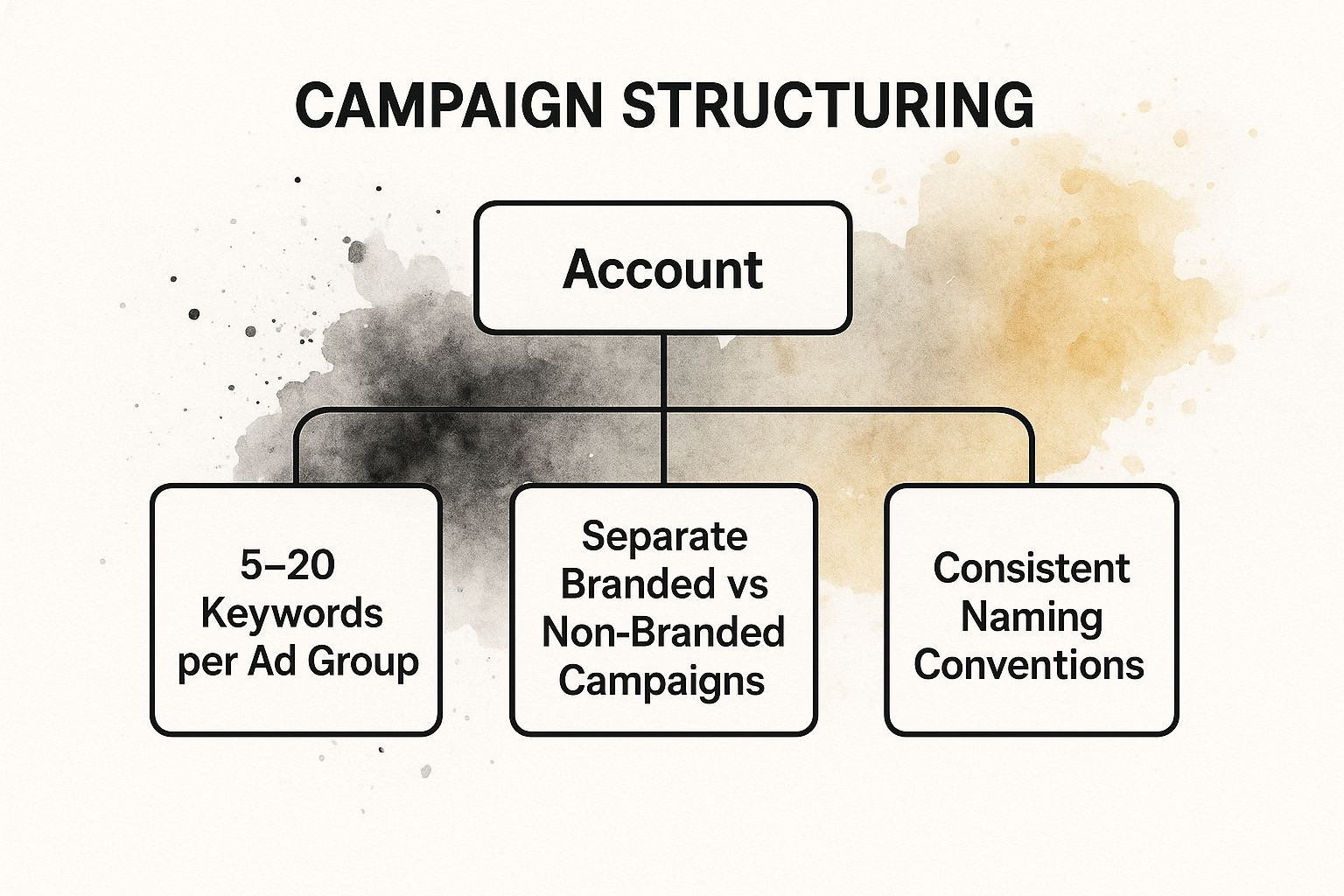
This hierarchy emphasizes that a well-managed account relies on consistent rules applied at every level, from separating major campaign types to maintaining keyword focus within ad groups.
Actionable Tips for Optimization
Pro Tip: Your naming convention is your best friend for quick analysis. Use a consistent format like
CampaignType_Targeting_Product/Service(e.g.,Search_USA_RunningShoes) so you can understand a campaign's purpose at a glance without clicking into its settings.
Implement these organizational practices immediately:
- Keep Ad Groups Tightly Themed: Limit each ad group to a small set of 5-20 closely related keywords. This ensures your ad copy can be hyper-relevant to every single keyword, boosting your Quality Score.
- Separate Branded and Non-Branded Campaigns: Always create a separate campaign for searches on your brand name (e.g., "DigitalAdvertisingDirect"). These have different performance metrics and user intent, and mixing them will skew your data.
- Use Different Campaigns for Different Networks: Do not mix Search, Display, and Video campaigns. Each network has a unique function and requires its own distinct strategy, budget, and targeting settings for optimal results.
For a deeper look into structuring your campaigns for success, this video provides excellent visual examples:
8. Manage Your Budget and Bids Strategically
Effective budget management is the engine of a sustainable Google Ads strategy. It involves more than just setting a daily spend limit; it's about the strategic allocation of your advertising dollars to maximize return on investment. Paired with intelligent bid optimization, this practice ensures your most valuable campaigns receive the resources they need to thrive, preventing budget exhaustion on underperforming segments.
This discipline transforms your budget from a simple constraint into a powerful lever for growth. By actively managing how and where your money is spent, you can direct funds to high-converting campaigns. For example, a local service provider can use dayparting to bid more aggressively during business hours when customers are actively seeking immediate help, ensuring their budget is spent at peak times.
How to Implement Strategic Bidding and Budgeting
Your approach to budget and bidding should be dynamic, adapting to performance data and market conditions. This ensures you remain competitive without overspending.
- Start Conservatively: Begin with a modest budget to gather initial performance data. As you identify profitable campaigns, you can confidently scale your investment.
- Utilize Bid Adjustments: Increase or decrease bids based on device, location, or time of day. A local restaurant could increase bids for users searching on mobile devices within a two-mile radius during lunch and dinner hours.
- Implement Shared Budgets: For campaigns with similar goals, a shared budget allows Google to automatically allocate funds to the campaigns with the most opportunities on any given day, improving efficiency.
Actionable Tips for Optimization
Pro Tip: Regularly check your campaign's "Impression Share Lost due to Budget" metric. If this number is high for a top-performing campaign, it’s a clear signal that increasing the budget could directly lead to more conversions and a better ROI.
Follow these best practices for superior financial control:
- Monitor Budget Pacing: Keep a close eye on how quickly your campaigns are spending their daily budget. If they run out of funds early in the day, you're missing out on valuable afternoon and evening traffic.
- Align Budgets with Business Goals: Allocate more budget to campaigns promoting your most profitable services. A real estate professional should shift spending towards campaigns for listings with higher commission potential.
- Test Automated Bidding: Once you have sufficient conversion data, experiment with Smart Bidding strategies like Target CPA or Target ROAS to let Google’s machine learning optimize bids for your specific goals.
Mastering budget and bid strategies is a cornerstone of advanced Google Ads management. This video offers further insights into optimizing your ad spend:
9. Continuously Improve Your Quality Score
Quality Score is Google's rating of the quality and relevance of your keywords and ads. It’s a crucial metric because it directly influences your ad rank and how much you pay per click. Improving this score is a fundamental Google Ads best practice that leads to lower costs, better ad positions, and a higher return on investment, making your advertising budget work smarter, not harder.
Think of Quality Score as your reputation with Google. A high score tells Google that your ads and landing pages are relevant and useful to users, so it rewards you with better placements at a reduced cost. Neglecting it means you'll likely overpay to get your ads seen, cutting directly into your profit margins.
How to Systematically Improve Quality Score
Improving your Quality Score involves a holistic approach focused on three core components. By enhancing each one, you create a seamless and relevant user experience.
- Expected Click-Through Rate (CTR): This measures the likelihood your ad will be clicked. To improve it, write compelling ad copy with a strong call-to-action. A local service provider could boost CTR by using ad copy like "Get a Free Estimate in 60 Seconds" instead of a generic "Local Services Available."
- Ad Relevance: This assesses how closely your ad matches the keywords in its ad group. Ensure your keywords, ad copy, and landing page are all tightly aligned. A realtor advertising "Miami beach condos" should have ads and a landing page that speak directly to that property type.
- Landing Page Experience: Google analyzes whether your landing page is relevant, useful, and easy to navigate. A local business can enhance this by ensuring their page loads quickly, is mobile-friendly, and presents clear information related to the ad's promise.
Actionable Tips for Optimization
Pro Tip: Don't try to fix everything at once. In your Google Ads account, add the Quality Score columns to your keyword report. Sort by impressions and focus on improving keywords that have a "Below average" or "Average" rating for a specific component. This targeted effort yields the fastest results.
Implement these practices for a higher score:
- Create Tightly Themed Ad Groups: Ensure every keyword in an ad group is closely related, allowing you to write hyper-relevant ads. Don't mix "emergency plumber" and "bathroom remodel" in the same group.
- Align Ad Copy with Keywords: Dynamically insert the user's search keyword into your headlines and descriptions to create a direct match and improve perceived relevance.
- Optimize Landing Page Content: Your landing page headline and body content must reflect the promise made in your ad. If your ad says "20% Off Your First Visit," that offer must be front and center on the landing page.
For a deeper look at creating ads that boost your score, this video offers excellent advice:
10. Commit to Continuous Testing and Analysis
A campaign launch isn’t the finish line; it’s the starting gun. Among the most crucial Google Ads best practices is the commitment to continuous testing and rigorous performance analysis. This data-driven approach transforms your campaigns from static billboards into dynamic, self-improving marketing engines. It’s the scientific method applied to advertising, ensuring that every dollar spent is guided by evidence, not assumptions.
Essentially, systematic A/B testing involves creating variations of your ads, landing pages, or bidding strategies to see which performs better. By isolating variables and measuring outcomes, you can methodically improve key metrics like click-through rate (CTR), conversion rate, and return on ad spend (ROAS). This process removes guesswork and empowers you to make optimization decisions with confidence.
How to Implement Systematic A/B Testing
Focus on testing one element at a time to achieve clear, unambiguous results. This disciplined approach allows you to attribute performance changes directly to the tested variable, providing actionable insights.
- Ad Copy Testing: Pit two different headlines against each other. A local service provider could test a benefit-driven headline like "Enjoy a Flawless Lawn This Spring" against a direct-offer headline like "50% Off Your First Lawn Service."
- Landing Page Testing: Test variations of your landing page to improve conversion rates. A real estate agent might test a page with a short "Contact Us" form against one with a more detailed "Schedule a Viewing" form to see which generates higher-quality leads.
- Bidding Strategy Testing: Use Google’s Campaign Experiments to test a new bidding strategy. For example, a business running on Manual CPC could test it against a Target ROAS strategy to determine which delivers more profitable sales.
Actionable Tips for Optimization
Pro Tip: Document every test, including your hypothesis, the variable tested, the duration, and the results. This log becomes an invaluable resource for your team, preventing repeat tests and building a repository of what works (and what doesn't) for your specific audience.
Follow these practices to build a robust testing framework:
- Test One Variable at a Time: To get clean data, only change one element per test. If you change the headline and the landing page simultaneously, you won't know which change drove the results.
- Ensure Statistical Significance: Don’t end a test prematurely. Use a statistical significance calculator to confirm that your results are not due to random chance before making a permanent change.
- Set Up Flawless Tracking: Before launching any test, verify that your conversion tracking is working perfectly. Without accurate data, your test results will be meaningless and could lead to poor decisions.
For a comprehensive look at setting up and running experiments within Google Ads, this official guide is an excellent resource:
Google Ads Best Practices Comparison Table
| Strategy | Implementation Complexity 🔄 | Resource Requirements ⚡ | Expected Outcomes 📊 | Ideal Use Cases 💡 | Key Advantages ⭐ |
|---|---|---|---|---|---|
| Keyword Research and Match Type Optimization | High – time-intensive research & ongoing adjustments | Moderate – tools like Keyword Planner, SEMrush | Highly relevant traffic, better Quality Score | E-commerce, local services, SaaS targeting niche or high-intent keywords | Improved ad relevance, higher conversion rates, cost control |
| Compelling Ad Copy and Extensions | Medium – continuous testing & extension setup | Low to Moderate – creative resources | Higher click-through rates, increased ad real estate | Seasonal promos, location-based services, feature highlight | Better visibility, improved ad rank, enhanced user experience |
| Landing Page Optimization and Relevance | High – requires web development and ongoing testing | High – development, design, testing tools | Improved conversion rates, higher Quality Scores | E-commerce product pages, lead gen, geo-targeted campaigns | Faster load, better UX, reduced bounce rates |
| Smart Bidding and Automated Strategies | Medium – initial setup, requires monitoring | Low – uses automated algorithms & conversion data | Optimized bids, time-saving, better ROI over time | Campaigns with sufficient conversion data (e-commerce, lead gen, apps) | Real-time optimization, saves manual effort, leverages ML |
| Audience Targeting and Segmentation | Medium – segment creation and management complexity | Moderate – analytics and audience data tools | More precise targeting, better engagement and conversion | B2C/B2B with distinct audience profiles, remarketing | Higher relevance, budget efficiency, multi-stage funnel targeting |
| Conversion Tracking and Attribution | High – technical setup and ongoing maintenance | High – integration with analytics platforms | Accurate performance measurement, better budget allocation | Complex campaigns with multiple conversion actions | Data-driven decisions, multi-touch insight, ROI clarity |
| Campaign Structuring and Organization | High – time-consuming setup and maintenance | Moderate – organizational effort | Easier management, improved reporting, better Quality Scores | Large accounts, multi-product/service businesses | Precise budget control, better relevance, simplified optimization |
| Budget Management and Bid Optimization | Medium – requires ongoing monitoring and adjustments | Moderate – analytical resources | Controlled spend, prioritized high-performers | Seasonal businesses, multi-campaign advertisers | Protects budget, flexible adjustments, prevents overspending |
| Quality Score Improvement | High – complex multi-touchpoint optimization | Moderate to High – requires coordination across areas | Lower CPC, higher ad position, improved account health | All Google Ads advertisers focusing on cost efficiency | Reduced costs, better positions, improved user experience |
| Testing and Performance Analysis | Medium to High – setup and analysis intensive | Moderate – analytics and testing tools | Continuous improvement, reduced guesswork | Data-rich accounts testing ads, keywords, landing pages | Data-driven optimization, better audience insights |
Conclusion: Turn Best Practices into Your Best Results
Mastering the ten fundamental pillars we've covered is the key to transforming your Google Ads from an expense into a powerful growth engine. The journey to success is paved with the consistent application of these proven google ads best practices. It’s not about finding a single secret setting, but building a comprehensive, interconnected system where each component—from keyword research and compelling copy to landing page relevance—strengthens the others.
The key takeaway is that Google Ads is not a 'set it and forget it' platform. It's a dynamic ecosystem that rewards vigilance, a results-oriented mindset, and a commitment to continuous, iterative improvement. By embracing constant testing and analysis, you turn assumptions into certainties and unlock new levels of performance. Applying these google ads best practices consistently is your pathway to not just participating in the digital marketplace, but truly leading it.
Want to simplify your ad campaigns and see better results? Discover our fully managed Meta and Google Ads solutions. Get Your Free, No-Obligation Strategy Session with Digital Advertising Direct Today!